
FOX13 Memphis
Standard Media GroupNews & Magazines
3.7866.00 Reviews
- Version
- Varies With Device
- Installs
- 100.00K
- Age Rating
- Everyone
Screenshots

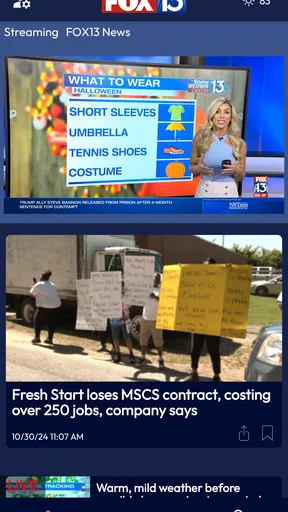
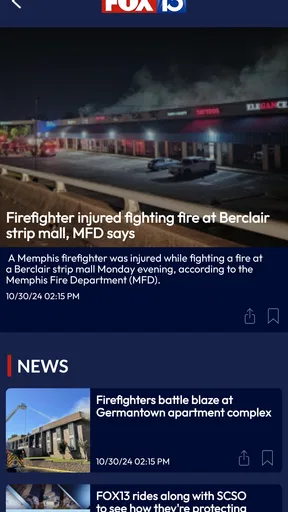

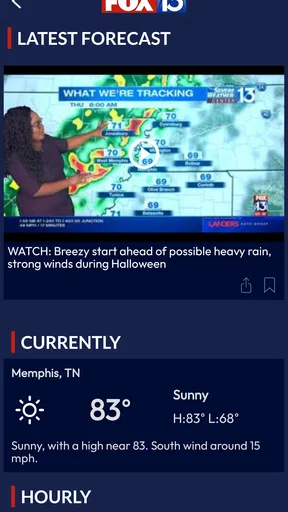
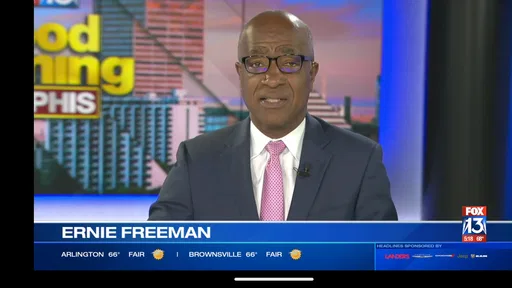
Our Review of FOX13 Memphis
 Analysis by Appyee
I usually turn to a local news app for one simple reason: I want useful information about the place where I live without sorting through a national feed first. FOX13 Memphis is built around that need, bringing Memphis news, traffic, weather, and live video into one mobile destination. After spending time with it, I found that its value depends less on flashy extras and more on whether you want a direct local-news routine.
The app is free, aimed at everyone, and comes from Standard Media Group. It sits in the News & Magazines category, where the main competition is not only other television-station apps but also browser bookmarks, social feeds, weather tools, and general news aggregators. My impression is that FOX13 Memphis makes the most sense when local coverage is your priority and you prefer a station-centered experience over a broad national app.
It has been available since July 2, 2010, and its long presence gives it a familiar role for people who already recognize the FOX13 Memphis brand. The current store listing shows a 3.7 average from around 3.2 thousand ratings, with more than 100 thousand installs. Those figures suggest a substantial audience, but they also tell me to keep expectations realistic: this is a practical local-news tool, not an app that will suit every reading habit.
Getting past the first points of friction
The first place many people can get stuck is deciding what they expect the app to do. FOX13 Memphis is not a replacement for every specialized tool on a phone. Its strength is putting local reporting, traffic information, weather coverage, and live video in the same place. If I open it expecting a full newspaper archive, a dedicated radar workstation, or a completely personalized national news reader, I may judge it unfairly.
I find it more useful to approach the app with a clear routine. In the morning, I would check the latest local headlines and traffic before leaving. Later, I might return for weather developments or a live video stream when an important event is unfolding. That workflow is more natural than opening the app repeatedly and expecting every section to behave like a separate specialist service.
Another common stumbling block is assuming that every part of the app will feel identical. Written stories, traffic information, weather content, and live video serve different purposes. A headline feed is convenient for scanning, while live video depends more heavily on a stable connection and the conditions of the broadcast. Treating a temporary delay in one area as proof that the entire app is broken can lead to unnecessary troubleshooting.
The most useful habit is to identify the information you need before tapping around. If I need a quick update, I start with the news area. If I am planning a drive, I go directly to traffic. If severe weather is the concern, I focus on the weather section rather than waiting for a general feed to answer every question. This small change makes the app feel faster because I am using it according to its purpose.
What to check before blaming the app
When a story or video does not load, I first check the basics outside the app. A weak mobile signal, a congested Wi-Fi connection, or a temporary loss of connectivity can affect news images and live video differently. Text may appear while video struggles, or the page may open while media remains unavailable. That difference is a useful clue rather than a contradiction.
I also close and reopen the app when a screen appears stuck. This is a simple step, but it often separates a one-time loading problem from a repeatable issue. If the same section continues to fail, I try another connection or check whether other apps are having trouble. There is no benefit in repeatedly tapping a live video control while the phone itself cannot maintain a reliable connection.
Keeping the app current is another sensible check. Updates can affect compatibility with the operating system and may improve stability, although I would not assume that every update changes the layout or adds a new feature. If the app has just been installed, I give it a moment to complete its first loading cycle instead of immediately concluding that content is missing.
Device storage and background activity can matter as well. A phone under heavy strain may handle a live stream less smoothly than a simple text page. Closing demanding apps, restarting the device, and trying again are reasonable general steps. I would avoid more drastic measures until I know whether the problem is limited to FOX13 Memphis or affects other services too.
A setup routine that saves time
My preferred setup is deliberately uncomplicated. I install the app, open each major content area once, and learn where local news, traffic, weather, and live video are located. Doing this while the connection is strong gives me a better baseline for later use. If something fails during that first check, I know it is not simply a problem caused by using the app in a moving car or in a weak-signal location.
I would also decide how the app fits alongside my existing tools. It can be the local source in a broader routine rather than the only app on the phone. For example, I might use FOX13 Memphis for Memphis-focused reporting and traffic, while keeping a separate general weather tool for detailed forecasting or a map app for navigation. That division of labor avoids expecting one local-news app to replace every service.
People who dislike interruptions should pay attention to how they prefer to consume information. A station app is naturally more editorially focused than a neutral list of feeds. I enjoy that because it reduces the amount of filtering I have to do, but another reader may prefer comparing several local sources before deciding what matters. In that case, FOX13 Memphis works better as one trusted local window than as the sole source for every story.
The age rating is Everyone, which makes the app approachable for a broad household audience. Still, the subject matter of local news can include upsetting events simply because that is the nature of current reporting. I would not hand a child the phone and assume that an Everyone rating means every individual story will be suitable for every age or mood.
Recovering when a normal workflow breaks
Suppose I open the app during breakfast and the headlines appear, but a live video refuses to start. My next step is not to reinstall immediately. I would confirm that other video services can play, switch between Wi-Fi and mobile data if appropriate, and reopen the app. If text and other sections work normally, the problem may be limited to the stream or the connection path rather than the entire application.
If a traffic update seems old, I would avoid treating the app as a substitute for active navigation guidance. Traffic information is useful for awareness and planning, but driving decisions still require attention to the road and a tool designed for turn-by-turn navigation. I would check the latest available information before leaving and avoid interacting with the phone while moving.
When weather information is the reason for opening the app, I use it as part of a wider safety routine. A local station app is valuable for regional context and developing coverage, but changing conditions can make any single screen insufficient. I would look at the freshest available update, keep alerts or other reliable sources in mind, and never delay a sensible safety decision while waiting for a page or video to load.
There is also a practical difference between an app that is slow and an app that is inaccurate. A slow screen may recover after a restart or connection change. A confusing headline or incomplete context may require reading the full story rather than relying on the short preview. I appreciate the convenience of quick scanning, but I do not treat a headline as the entire report, especially when the subject affects travel, safety, or local decisions.
One useful, less obvious workflow is to use the app in two passes. On the first pass, I scan only for stories relevant to my day. On the second, I open the items that could change my plans and read beyond the headline. This prevents the common mistake of consuming a large number of updates without understanding which ones actually matter.
When the problem is outside FOX13 Memphis
News apps depend on more than their own screens. A phone’s network, operating system, available storage, and background workload can all influence the experience. Live video is especially sensitive because it requires a sustained connection rather than a brief request for text. If video fails only in one location, that points me toward connectivity before I blame the application.
Likewise, if every app on the phone is slow, the issue is probably broader than FOX13 Memphis. I would restart the device, check the connection, and try again later. If only one section repeatedly misbehaves while everything else works, then reinstalling may become a reasonable final troubleshooting step, but I would use it carefully because it can reset local app behavior and require me to establish my routine again.
Readers should also remember that local news is time-sensitive by nature. A story can change after I first read it, and a traffic situation can develop after an earlier update. That is not necessarily a software defect. The correct response is to look for the newest available information and avoid making a major decision from an old screen left open for a long time.
This is where FOX13 Memphis differs from a static reference app. Its usefulness rises and falls with current events, connection quality, and how often I check it. Someone wanting permanent offline reading may prefer downloaded articles or a reading service designed for that purpose. Someone wanting local context during a developing Memphis story, however, is more likely to appreciate the station-focused approach.
How it compares with common alternatives
Compared with a general national news app, FOX13 Memphis gives local concerns a clearer place in the experience. I do not have to search through national politics, international coverage, and unrelated headlines to find information about Memphis. The trade-off is breadth: a general app is better when I want a wide range of regions and subjects in one feed.
Compared with visiting the station’s website in a browser, the app offers a more direct mobile habit. I can open one dedicated destination instead of navigating through browser tabs, and the combination of news, traffic, weather, and live video feels organized around phone use. A browser remains preferable for people who rarely read local news or do not want another app taking up space on the device.
Compared with a dedicated weather app, FOX13 Memphis is more useful for local reporting and the human context around weather events, while a specialist weather tool may be better for detailed forecasting views or repeated forecast checks. I would use the station app to understand what is happening locally and a specialized tool when I need more technical weather planning.
Compared with social media, the app gives me a more focused route to station coverage and avoids relying entirely on posts that may be incomplete or difficult to verify. Social feeds can surface eyewitness information quickly, but they can also be noisy. FOX13 Memphis is the better first stop when I want organized local coverage rather than an endless stream of reactions.
Who will get the most from it
I would recommend FOX13 Memphis to Memphis residents who want a straightforward local-news companion, commuters who check traffic before leaving, and viewers who value access to station coverage in a mobile format. It also suits people who prefer a single local source for several related needs instead of maintaining separate station, traffic, and weather routines.
It is less suitable for someone who wants a highly customized national news dashboard, an offline reading library, or a professional-grade navigation and weather workstation. It may also disappoint readers who expect every update to arrive in exactly the same format, because written reports and live video naturally behave differently.
For families, the Everyone rating removes an obvious age barrier, but I would still guide younger users toward appropriate stories. For older phones or devices that struggle with media-heavy content, I would pay particular attention to how smoothly video works before making it the main reason to keep the app installed.
My practical verdict
After using FOX13 Memphis as a local information tool, I see its strongest quality in focus. It does not try to be every kind of news service. Instead, it gives Memphis-related news, traffic, weather, and live video a shared home, which is convenient when those are the updates that affect my day.
The free price makes it easy to try without committing money, and the Everyone rating keeps it broadly accessible. Standard Media Group has built an app that is most useful when I approach it with realistic expectations: check the right section, confirm that the connection is healthy, and remember that live information can change quickly.
My recommendation is positive for local readers who want a station-centered routine. I would install it, test the main sections on a reliable connection, and use it alongside navigation or specialist weather tools when those jobs require more detail. FOX13 Memphis is at its best as a focused local companion, not as a complete replacement for every news and information app on a phone.
Verdict
Strengths of FOX13 Memphis
- Provides local Memphis news, weather, and traffic updates in one app.
- Live video coverage helps users follow breaking stories as they develop.
- Push alerts can notify you quickly about important local events.
- Includes forecasts useful for planning commutes and outdoor activities.
- Covers community stories that may receive less attention from national outlets.
Limitations of FOX13 Memphis
- Frequent notifications may feel excessive unless alert settings are customized.
- Some content may require a stable connection for smooth video playback.
- Advertising can interrupt browsing and reduce the reading experience.
- Coverage is focused on the Memphis area and may feel limited elsewhere.
- App performance and video loading may vary on older devices or slower networks.
Similar Picks in This Category
View All
Google News - Daily Headlines
Google LLC4.0

X
X Corp.4.8

Flipboard:Your Social Magazine
Flipboard3.4

Opera News: breaking & local
Opera4.5

Hindi News by Dainik Bhaskar
Dainik Bhaskar Group4.0

Way2News Daily News App
Way2News ( Formerly Way2SMS )4.6
Frequently Asked Questions
What is FOX13 Memphis?
FOX13 Memphis is the official news and weather app for the Memphis, Tennessee, area. It provides access to local and regional news stories, video reports, weather forecasts, radar information, severe weather alerts, traffic updates, and other content from FOX13 News. The app is designed for users who want convenient updates while away from a television or computer.
What features does the FOX13 Memphis app offer?
The app typically includes breaking-news notifications, live or on-demand video, local headlines, weather forecasts, interactive radar, hourly and extended forecasts, severe-weather information, and reports covering areas such as crime, community events, sports, and traffic. Available features can change over time, and some live streams or videos may depend on your location, internet connection, or current station coverage.
Does FOX13 Memphis provide live news and weather coverage?
FOX13 Memphis may offer live newscasts, live breaking-news coverage, weather updates, or video clips directly through the app. However, live availability is not guaranteed at every moment because it can depend on the station’s broadcast schedule, breaking events, regional restrictions, and technical conditions. Users should also expect that some content may be available only on demand.
Does the FOX13 Memphis app send notifications?
Yes, FOX13 Memphis can use push notifications to alert users about breaking local news, severe weather, school or community developments, and other important updates. Notifications are generally optional, so you can enable or disable them in the app or your device settings. If you allow alerts, remember that frequent notifications may use small amounts of battery and mobile data.
Is FOX13 Memphis free to download and use?
The FOX13 Memphis app is generally free to download, and its main news, weather, and video features are typically available without a paid subscription. An internet connection is required, and watching videos or streaming live coverage can consume mobile data. The app may also contain advertising, while certain content or features could vary according to location, platform, or station policies.
